> ## Documentation Index
> Fetch the complete documentation index at: https://docs.medstrato.com/llms.txt
> Use this file to discover all available pages before exploring further.
# Tender Management — AI-Powered Bid Automation
> Manage the full bid lifecycle with AI: create tenders, parse RFPs, match products, generate proposals, and export submission-ready packages. Cut bid prep time by up to 80%.
# Tender Management
MedStrato Tenders turns complex procurement into a streamlined, AI-driven workflow. From RFP intake to proposal export, every step is assisted — so your team spends less time on paperwork and more time winning.
 ## Related product resources
Compare the full platform and tender automation feature set.
Follow the full RFP-to-submission workflow.
Open the SaaS workspace and create a tender record.
## Why teams choose MedStrato for tenders
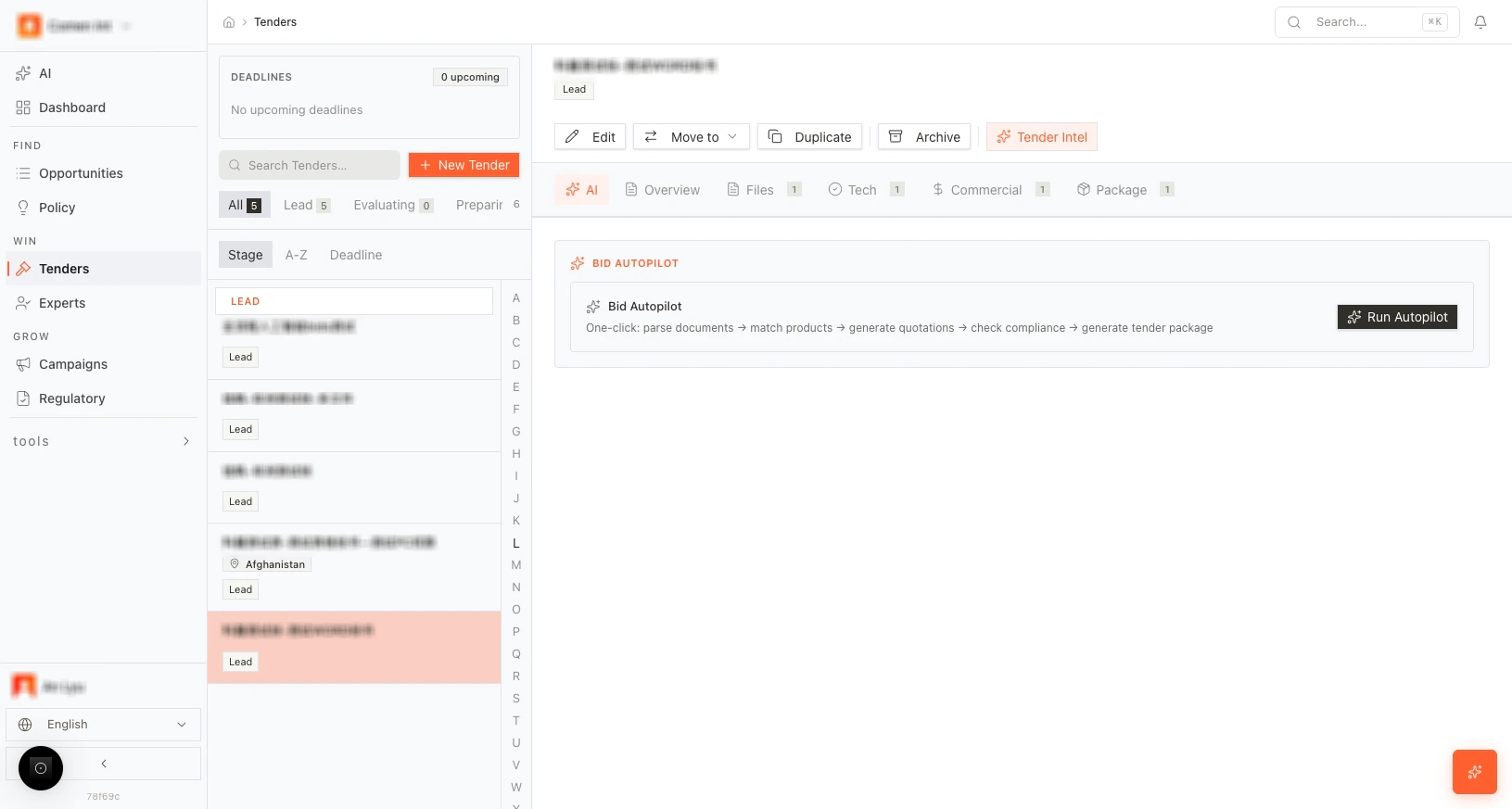
One click runs the full flow: parse documents, match products, generate quotes, check compliance, and build the proposal package.
Upload a 200-page RFP and get structured requirements in seconds — no manual extraction needed.
Ask natural-language questions about any tender. Get instant answers with source references from the parsed documents.
## The bid lifecycle at a glance
Every tender follows a clear path:
Set up the tender with metadata, timelines, and financials.
Upload RFP documents and let AI extract categories and requirements.
Match products to requirements, verify compliance, and generate proposal text.
Build the quotation with margin tools, price suggestions, and fee management.
Generate a professional proposal document. Refine with AI, then export as DOCX or PDF.
Record win/loss outcomes and reasons. The system uses this feedback to improve future bid scoring.
## How teams use MedStrato Tenders
A regional distributor receives a 180-page hospital procurement RFP with 47 technical requirements. The bid manager uploads the document, runs Bid Autopilot, and has a compliance-checked, priced proposal draft ready for review within an afternoon — a process that previously took two weeks of manual work across three departments.
A small commercial team manages five active government tenders simultaneously. With MedStrato's stage pipeline and deadline tracking, nothing falls through the cracks. Bid Autopilot handles the routine tenders while the team focuses manual effort on the two highest-value opportunities.
A lab equipment company keeps losing tenders on technical compliance gaps they discover too late. After switching to MedStrato, AI compliance checking flags partial-match items during the Technical editor stage. The team addresses every gap before submission, improving their compliance score from 72% to 96% — and their win rate follows.
A hospital procurement director notices that supplier proposals arrive inconsistent and incomplete. They recommend MedStrato to key suppliers. The result: proposals arrive structured, complete, and on time — reducing the evaluation cycle by 40%.
## Guides in this section
Set up a new tender with all required metadata and timelines.
Upload RFP documents and extract structured requirements with AI.
Match products, check compliance, and generate proposal text.
Build quotations with pricing, margins, and financial tools.
Generate, refine, and export the final proposal document.
Automate the entire bid flow in one click.
Ask AI questions about any tender's documents and requirements.
Record outcomes and capture lessons for future bids.
## Related product resources
Compare the full platform and tender automation feature set.
Follow the full RFP-to-submission workflow.
Open the SaaS workspace and create a tender record.
## Why teams choose MedStrato for tenders
One click runs the full flow: parse documents, match products, generate quotes, check compliance, and build the proposal package.
Upload a 200-page RFP and get structured requirements in seconds — no manual extraction needed.
Ask natural-language questions about any tender. Get instant answers with source references from the parsed documents.
## The bid lifecycle at a glance
Every tender follows a clear path:
Set up the tender with metadata, timelines, and financials.
Upload RFP documents and let AI extract categories and requirements.
Match products to requirements, verify compliance, and generate proposal text.
Build the quotation with margin tools, price suggestions, and fee management.
Generate a professional proposal document. Refine with AI, then export as DOCX or PDF.
Record win/loss outcomes and reasons. The system uses this feedback to improve future bid scoring.
## How teams use MedStrato Tenders
A regional distributor receives a 180-page hospital procurement RFP with 47 technical requirements. The bid manager uploads the document, runs Bid Autopilot, and has a compliance-checked, priced proposal draft ready for review within an afternoon — a process that previously took two weeks of manual work across three departments.
A small commercial team manages five active government tenders simultaneously. With MedStrato's stage pipeline and deadline tracking, nothing falls through the cracks. Bid Autopilot handles the routine tenders while the team focuses manual effort on the two highest-value opportunities.
A lab equipment company keeps losing tenders on technical compliance gaps they discover too late. After switching to MedStrato, AI compliance checking flags partial-match items during the Technical editor stage. The team addresses every gap before submission, improving their compliance score from 72% to 96% — and their win rate follows.
A hospital procurement director notices that supplier proposals arrive inconsistent and incomplete. They recommend MedStrato to key suppliers. The result: proposals arrive structured, complete, and on time — reducing the evaluation cycle by 40%.
## Guides in this section
Set up a new tender with all required metadata and timelines.
Upload RFP documents and extract structured requirements with AI.
Match products, check compliance, and generate proposal text.
Build quotations with pricing, margins, and financial tools.
Generate, refine, and export the final proposal document.
Automate the entire bid flow in one click.
Ask AI questions about any tender's documents and requirements.
Record outcomes and capture lessons for future bids.