

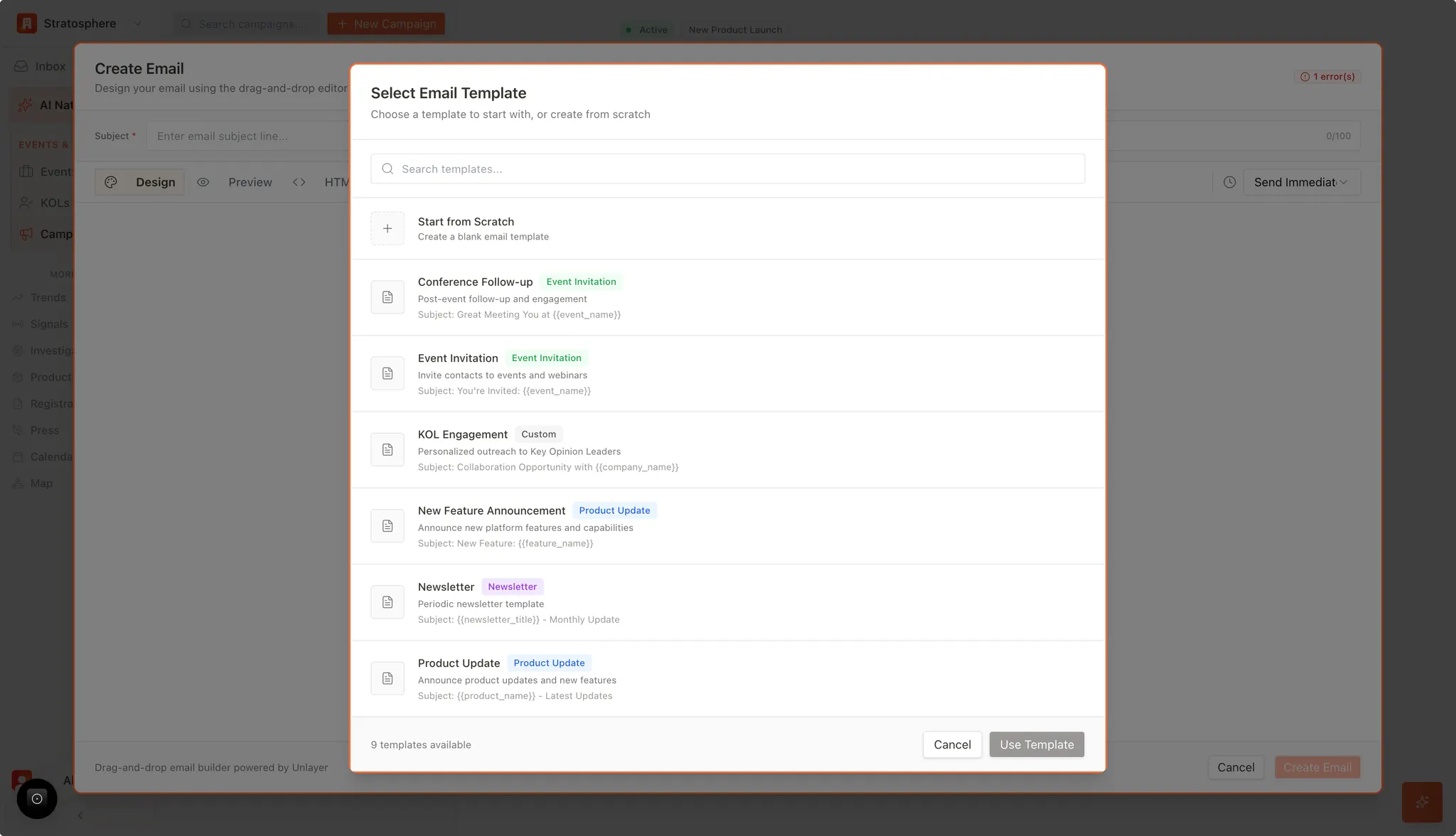
What you can do
- Start from a proven template for faster drafting.
- Keep branding and structure consistent across campaigns.
- Use dynamic placeholders (variables) to personalize at scale.
Common template types
The system offers specialized templates tailored to common industry engagement scenarios:- Event invitations and follow-ups: pre-mapped placeholders (e.g.,
{{event_name}}) to pull event context. - Strategic Engagement: The “KOL Engagement” template is designed for high-touch, personalized outreach regarding collaboration opportunities.
- Product and Innovation Updates: “New Feature Announcement” and “Product Update” templates allow for the structured presentation of new technical capabilities or medical device specifications to relevant experts.
- Periodic Outreach: The “Newsletter” template facilitates regular organizational updates to maintain long-term professional relationships.
Drafting options
Users have full flexibility in how they construct their communications:- Start from Scratch: Enables the creation of a completely custom email layout for unique requirements.
- Template Utilization: Users can select a pre-defined template as a foundation and modify it using the integrated drag-and-drop editor.
- Dynamic Data Integration: Templates utilize standardized variables to personalize content at scale, ensuring each recipient receives relevant information regarding specific events or products.