

Steps
- Open
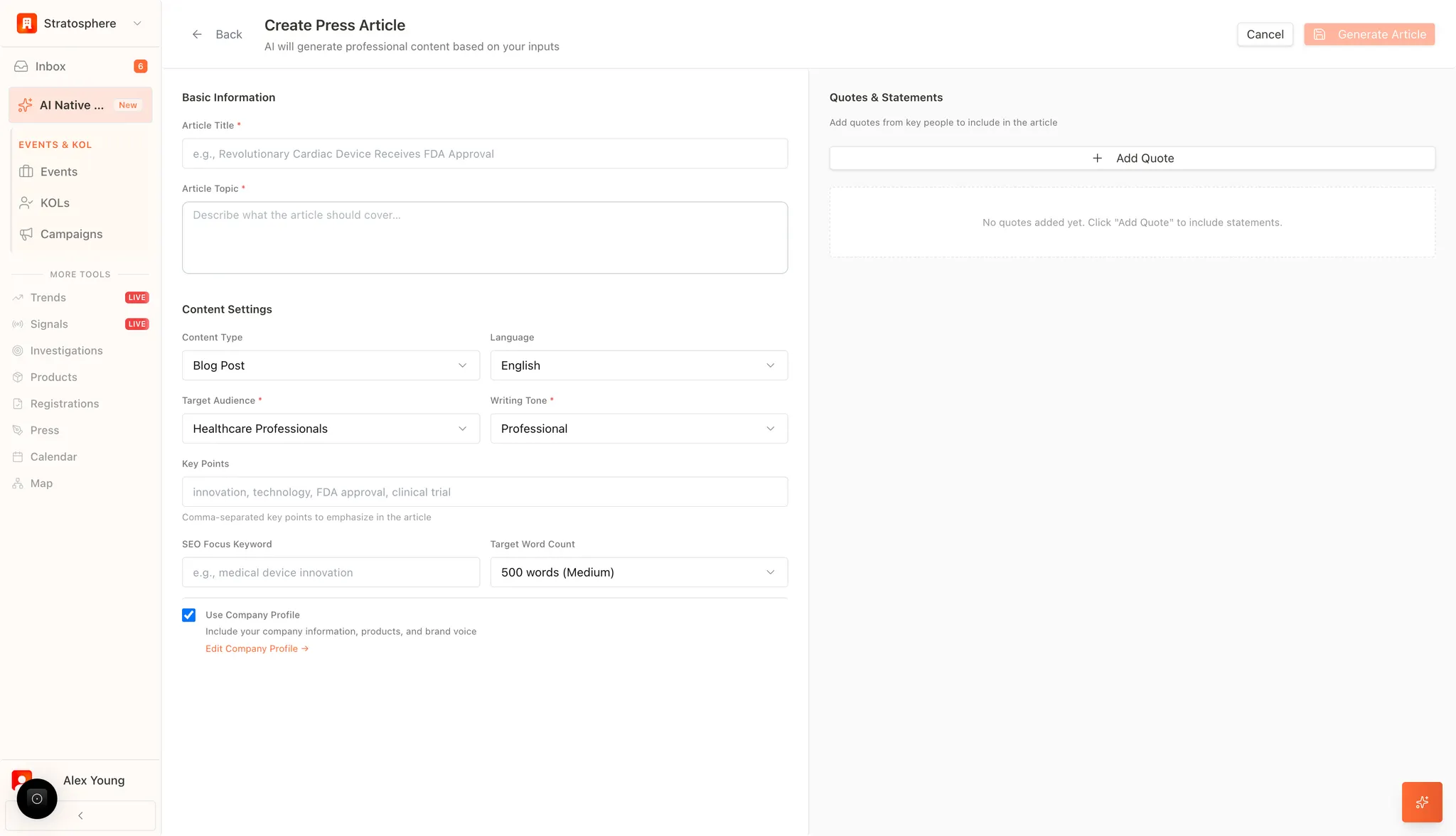
Pressand click New Article. - Fill in basics (title/topic) and the key points you must include.
- Choose content settings (type, audience, language, tone).
- Add SEO keywords and a target length if needed.
- Optionally add quotes, then click Generate Article.
Basics (title, topic, key points)
- Article Title and Topic: Users establish the primary headline and a detailed description of the article’s core subject. This ensures the AI understands the specific context, such as a regulatory milestone, clinical trial success, or technological innovation.
- Key Points: This field allows for the input of specific, comma-separated details (e.g., “FDA approval,” “clinical trial data”) that must be emphasized within the narrative to ensure factual accuracy and strategic focus.
Content settings
- Content Type and Audience: Select from various formats—such as Blog Posts, Press Releases, or Professional Summaries—and define the target demographic (e.g., Healthcare Professionals, Investors, or Industry Analysts).
- Language and Tone: Supports multi-lingual generation and specific writing tones (e.g., Professional, Informative, or Technical) to ensure the content resonates with the intended readership.
- SEO and Length Optimization: Users can define SEO Focus Keywords to maximize digital visibility and set a Target Word Count to meet specific publication requirements.
Quotes (optional)
- Stakeholder Attributions: Users can manually add direct quotes from Key Opinion Leaders (KOLs), clinical investigators, or company executives.
- Authenticity: Integrating these personalized statements allows the AI to weave expert opinions seamlessly into the narrative, providing the “human element” and professional validation required for high-impact industry communications.
Brand alignment
- Company Profile Integration: By enabling the “Use Company Profile” option, the AI automatically incorporates verified company background information, product portfolio details, and the established corporate brand voice into every draft.
- Generation: Once all parameters and quotes are configured, the Generate Article function initiates the autonomous drafting process, producing a polished, ready-to-review professional document.
Related resources
- Press & Articles overview: Manage AI-assisted articles and announcements.
- Improve an article: Refine selected text and generate alternatives.
- Company profile AI context: Keep company background and brand voice consistent.
- AI prompt tips: Write prompts that produce clearer content.