

Where to find it
- Open
KOL→ select a profile card.
What you’ll see
Intelligence (AI insights)
-
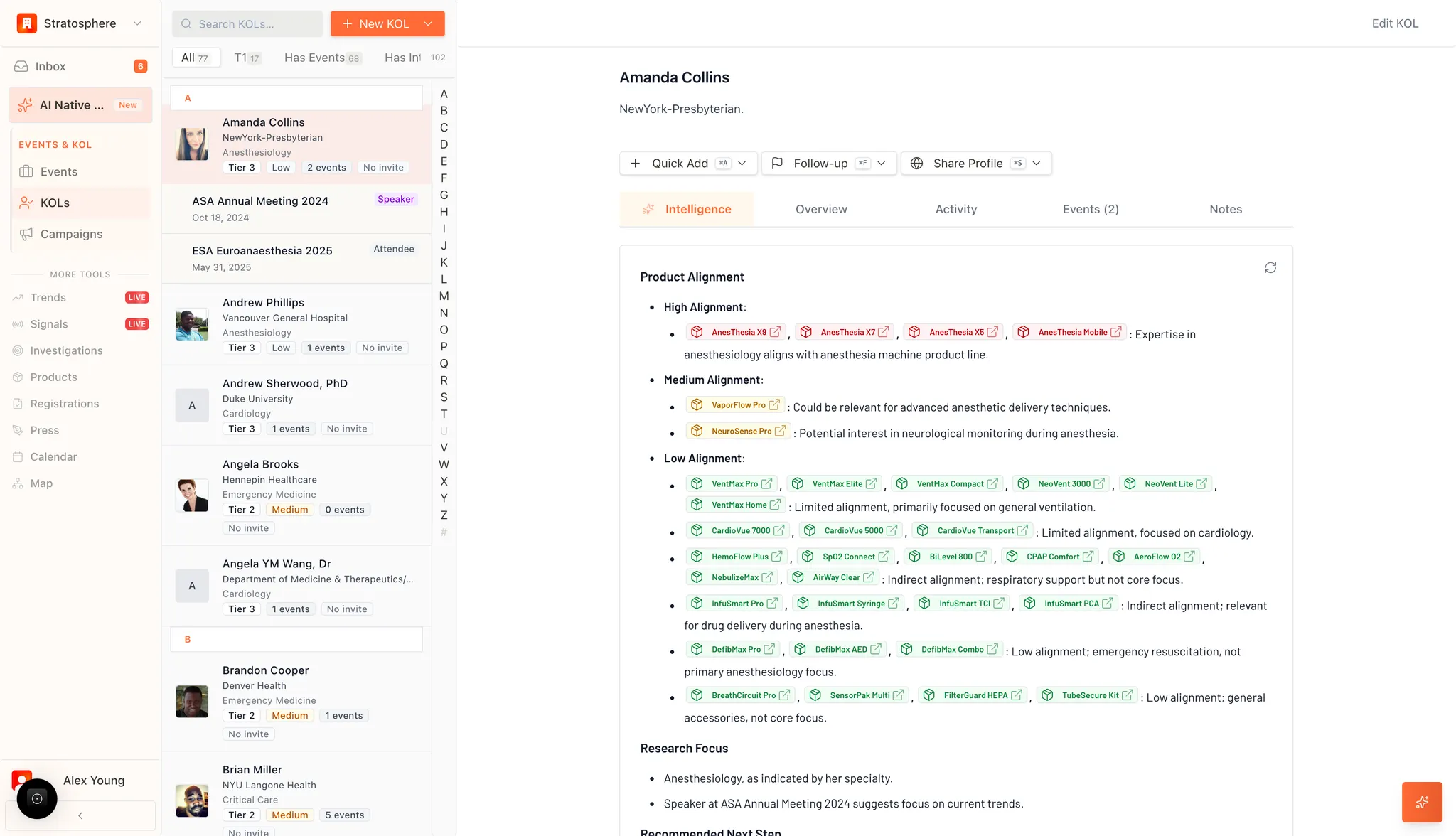
Product Alignment Analysis
The system automatically evaluates the KOL’s professional background against your organization’s product portfolio, categorizing them into three levels of relevance:
- High Alignment: Identifies products directly within the KOL’s core expertise (e.g., anesthesia machines for an Anesthesiologist). The system provides a specific rationale for why this alignment exists.
- Medium Alignment: Lists products that are relevant to advanced techniques or related clinical interests that the KOL has demonstrated.
- Low Alignment: Identifies products with indirect relevance, typically focused on general clinical support or non-core areas of the KOL’s practice.
- Interactive Links: Each product icon functions as a hyperlink, allowing users to jump directly to detailed product specifications within the system.
- Research Focus The AI summarizes the KOL’s academic and professional trajectory. By analyzing historical event participation (e.g., ASA Annual Meeting) and stated specialties, the system generates a concise summary of the expert’s current clinical interests and research priorities.
- Recommended Next Steps Based on the synthesized data, the system provides strategic guidance on how to best proceed with the KOL, such as suggesting specific topics for outreach or identifying upcoming events for potential engagement.
Profile tabs
Beyond the Intelligence module, the profile includes several secondary management tabs:- Overview: Displays core bio-data, contact information, and professional credentials.
- Activity: A chronological log of all past interactions and communications with the KOL.
- Events: A specific registry of all internal and external events the KOL has attended or is scheduled to attend.
- Notes: A repository for qualitative internal comments and relationship documentation.
Actions
Located at the top of the profile, the action toolbar facilitates immediate engagement:- Quick Add: Allows for rapid assignment of the KOL to a specific event or campaign.
- Follow-up: Triggers a reminder or task within the system to ensure continuous engagement.
- Share Profile: Generates a secure link or export of the KOL’s profile for internal distribution.
- Edit KOL: Opens the configuration menu to manually update profile data.