

What you can do
- Identify regions with active funding flows and procurement activity.
- Compare top recipient countries by volume and value.
- Search and filter the underlying project registry for specific markets or needs.
How to read the map
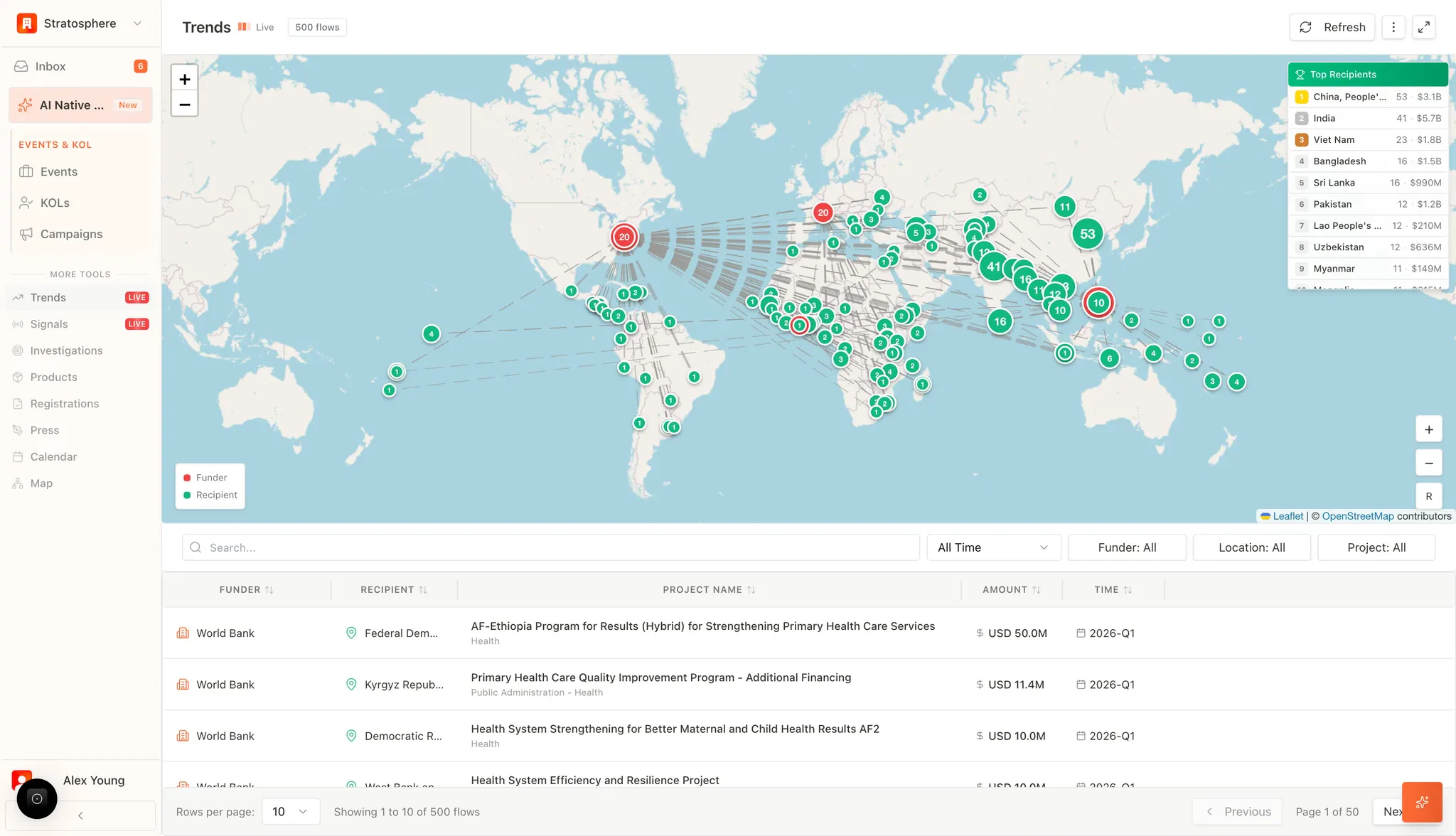
The interactive map provides a visual representation of how healthcare capital moves globally:- Funders (Red Nodes): Identifies the primary source organizations initiating the funding or procurement requests.
- Recipients (Green Nodes): Identifies the specific countries or regions receiving the equipment or funding.
- Flow Lines: Illustrates the direct connection between funding sources and destination projects, allowing users to identify emerging market clusters and international procurement corridors.
Top recipients
The Top Recipients sidebar provides a high-level summary of market activity, ranking countries by:- Volume: The total number of active procurement flows or projects.
- Financial Value: The total monetary scale of the medical equipment and health initiatives assigned to that region.
Project registry
The data table beneath the map provides granular transparency into every individual flow:- Funder and Recipient: Lists the specific organizations and sovereign nations involved in the transaction.
- Project Name and Scope: Provides the official title and sector classification (e.g., “Health System Efficiency and Resilience Project”), giving users insight into the specific types of medical equipment and services required.
- Amount: Displays the precise financial scale of the project (e.g., USD 50.0M).
- Timeframe: Indicates the fiscal period or quarter (e.g., 2026-Q1) in which the funding or project is scheduled.
Filters
To facilitate targeted market research, users can refine the global dataset using the following parameters:- Search Bar: Locate specific projects or keywords within the procurement descriptions.
- Time Filter: Analyze historical trends or upcoming quarterly forecasts.
- Funder/Location Filters: Isolate data from specific organizations or geographic regions.
- Project Filter: Categorize results by specific medical niches or project types.