

What you can do
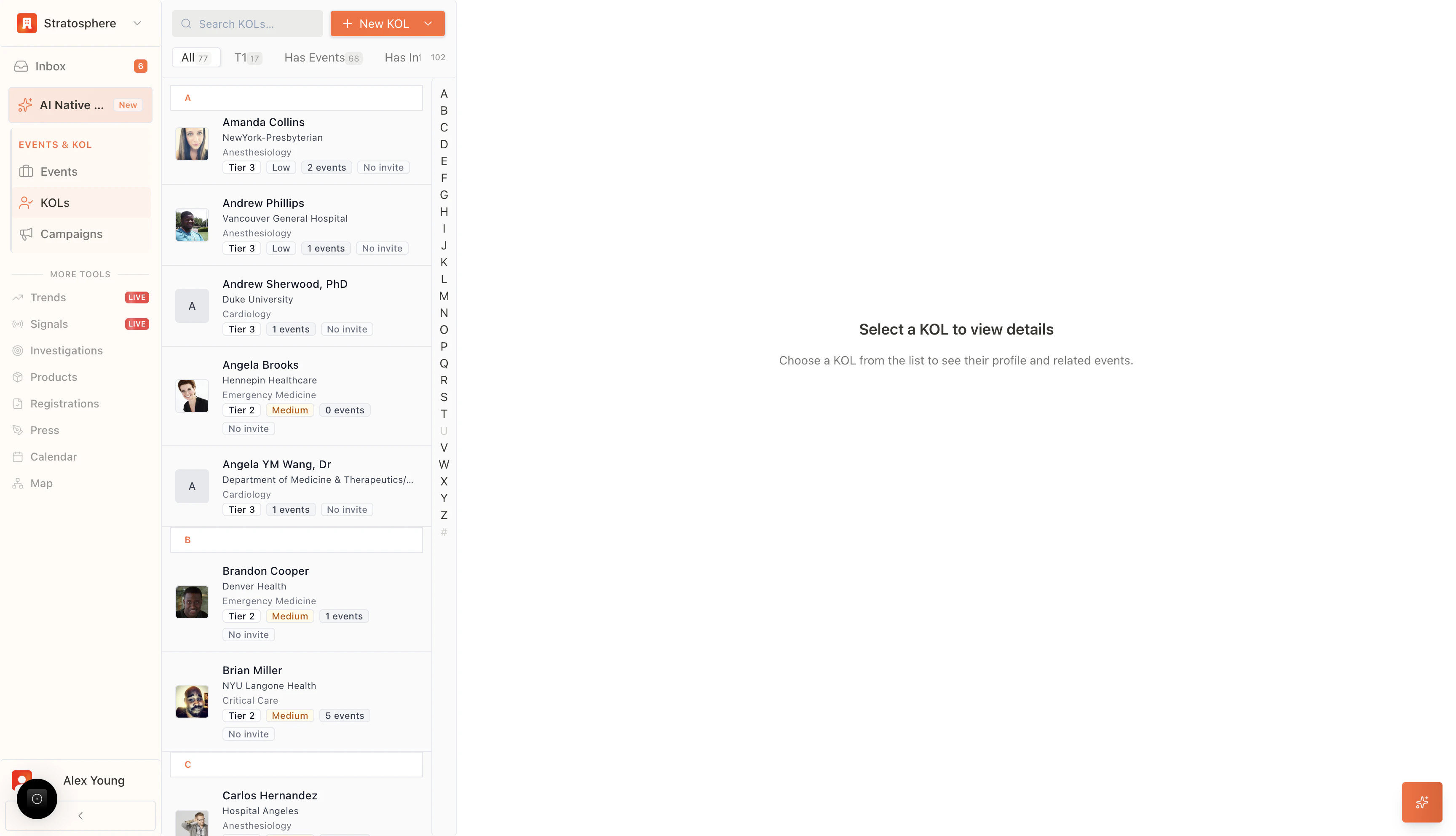
- Search and filter KOLs by name, institution, specialty, tier, and engagement.
- Add KOLs manually or import in bulk.
- Open a KOL profile to see insights, activity, events, and notes.
Where to find it
- Open
KOLfrom the main navigation.
Find and segment KOLs
- Search: use the top bar to search by name, institution, or specialty.
- A–Z index: jump to a surname range quickly.
- Quick filters: segment by tier, event history, or invitation status.
- Professional Identity: Displays the KOL’s name, primary institution, and medical specialty (e.g., Anesthesiology, Cardiology).
- Tiering and Classification: Indicates the assigned strategic importance (e.g., Tier 2, Tier 3) and engagement level (e.g., Low, Medium).
- Engagement History: Shows the number of previous events the KOL has participated in and their current invitation status (e.g., “No invite”).
Common actions
- Add New KOL: The “New KOL” button initiates the process of creating a new expert profile within the database.
- Detailed View: Selecting a specific profile card from the list will populate the right-hand panel with comprehensive data, including full engagement history, research background, and related event details.