

Create a Tender
Every bid starts with a tender record. The richer your metadata, the better AI features like compliance checking and Tender Intel perform downstream.Scenario: Sarah, a bid manager at a medical device company, receives a new RFP from a regional hospital. She opens MedStrato, clicks New Tender, fills in the key fields in under three minutes, and moves on to uploading documents.
Open the form
Navigate to Tenders → New Tender, or go directly to app.medstrato.com/bids/new.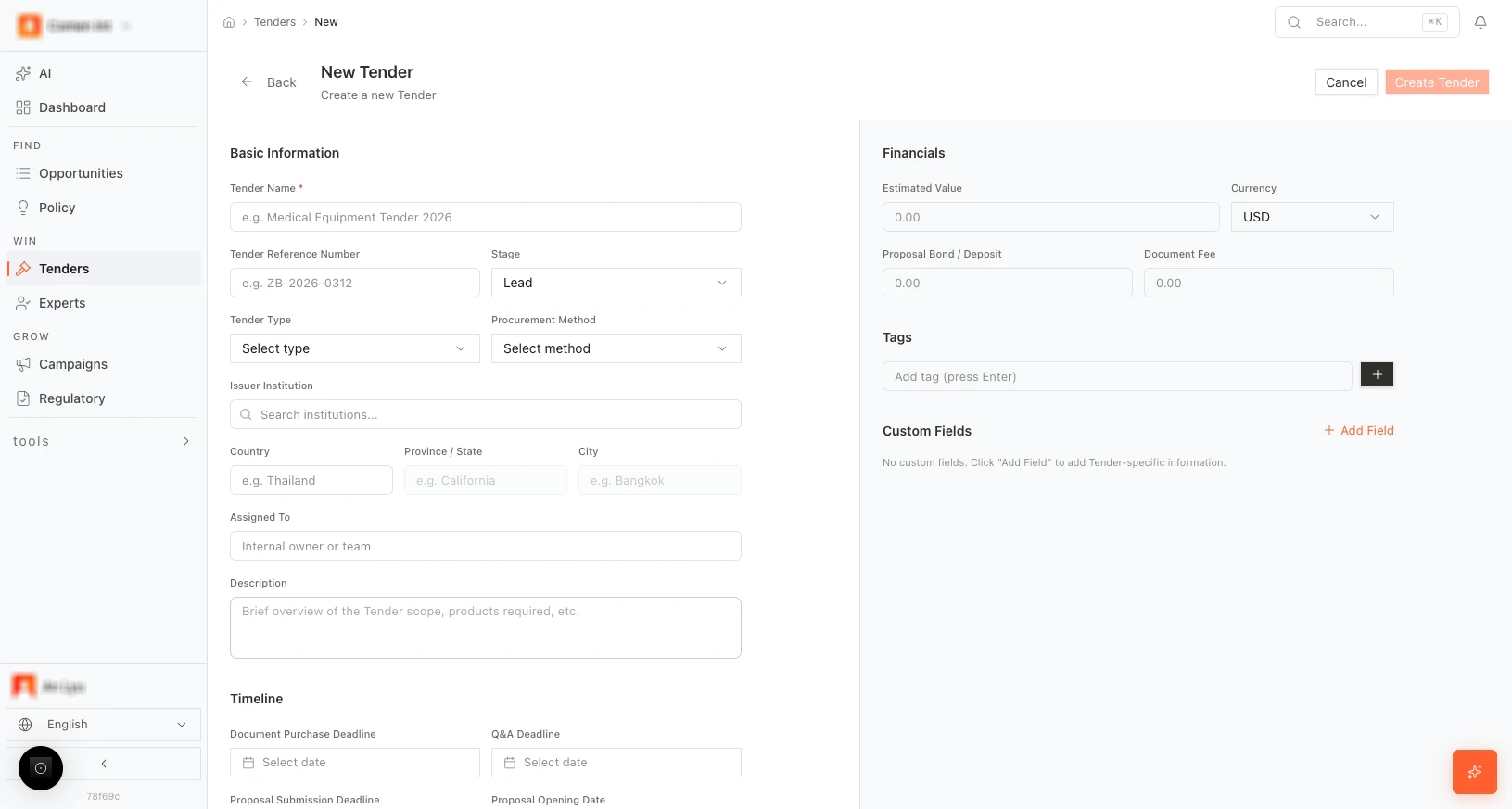
Form fields
Basic information
| Field | Required | Description |
|---|---|---|
| Tender Name | Yes | Short, descriptive name for internal tracking |
| Tender Reference Number | No | Reference or ID from the issuing body |
| Stage | No | Current stage (default: Lead) |
| Tender Type | No | Procurement type (open, restricted, etc.) |
| Procurement Method | No | Bidding method (competitive, negotiated, etc.) |
| Issuer Institution | No | Search and select the issuing organization |
| Country / Province / City | No | Geographic location of the tender |
| Assigned To | No | Team member responsible for the bid |
| Description | No | Free-text summary of scope and context |
Financials
- Estimated Value — Expected contract value.
- Currency — Currency for all amounts.
- Proposal Bond / Deposit — Required bond, if any.
- Document Fee — Fee to obtain tender documents, if applicable.
Timeline
- Document purchase deadline — Last date to obtain documents.
- Q&A deadline — Last date to submit clarification questions.
- Proposal submission deadline — Final submission date.
- Proposal opening date — When bids are opened.
Tags and custom fields
- Tags — Add labels for filtering (e.g., “urgent”, “hospital”, “oncology”).
- Custom fields — Click + Add Field for internal codes or categories.
Save
Click Create Tender to save. You are taken to the tender overview where you can begin uploading documents.More scenarios
Parallel tenders: A sales director creates five tenders in a single morning — one per region — using consistent metadata and tags. Later, the dashboard shows pipeline value by country, helping the CEO prioritize resources.
Template reuse: A bid coordinator duplicates a won tender as a template for a similar upcoming procurement. The metadata, product catalog, and pricing structure carry over — only the requirements need updating.
Next step
Upload documents and run AI parse →Related resources
Tender Automation Overview
See how the website explains spec matching, compliance evidence, and product matching.
Tender Bid Automation Use Case
Review the complete workflow from RFP intake to final submission.